
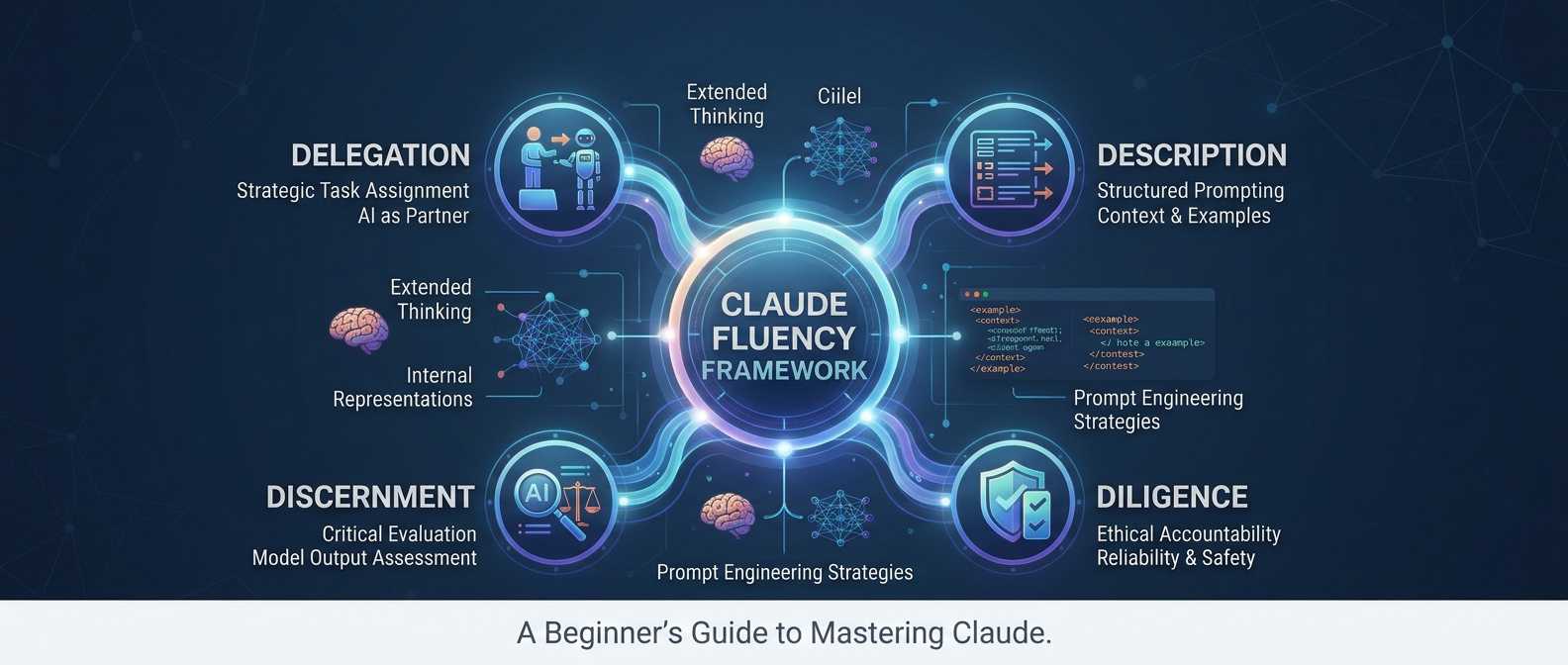
The AI Fluency framework for using Claude centers on four core competencies: delegation, description, discernment, and diligence. In the video course lessons linked below, users will learn to strategically assign tasks, communicate clearly using structured prompts, critically evaluate model outputs, and maintain ethical accountability. This training material highlights how generative models function through pre-training and fine-tuning, emphasizing that successful collaboration requires treating AI as an intelligent partner rather than a simple database. (Also see the Beginner’s Guide to Mastering Claude below.)
Practical prompt engineering strategies are explored, including providing context, adding examples, breaking tasks into step-by-step reasoning, and utilizing system prompts with XML delimiters. Finally, the sources touch on advanced concepts like extended thinking and internal representations, illustrating how ongoing experimentation helps users maximize the reliability and safety of AI systems. For more advanced tutorial on coding apps with Claude code please see our Beginner’s Blueprint to Building Apps with Claude Code.
Video Course Lessons for AI:
- AI Fluency: Framework & Foundations Course Trailer
- Lesson 1: Introduction to AI Fluency | AI Fluency: Framework & Foundations Course |
- Lesson 2A: Why do we need AI Fluency? | AI Fluency: Framework & Foundations Course
- Lesson 2B: The 4D Framework | AI Fluency: Framework & Foundations Course
- Lesson 3A: What is generative AI? (Deep Dive) | AI Fluency: Framework & Foundations Course
- Lesson 3B: Capabilities & limitations | AI Fluency: Framework & Foundations Course
- Lesson 4: A closer look at Delegation | AI Fluency: Framework & Foundations Course
- Lesson 6: A closer look at Description | AI Fluency: Framework & Foundations Course
- Lesson 7: Effective prompting techniques (Deep Dive) | AI Fluency: Framework & Foundations Course
- Lesson 8: A closer look at Discernment | AI Fluency: Framework & Foundations Course
- Lesson 10: A closer look at Diligence | AI Fluency: Framework & Foundations Course
- AI prompt engineering: A deep dive
- Prompting 101 | Code w/ Claude
- Turning Claude into your thinking partner
- The different levels of how Claude thinks
The Four Pillars of Anthropic’s AI Fluency framework
Delegation: Strategically deciding what work to hand over to Claude versus what to handle yourself.
- How to use it: Define your exact goals and success criteria (problem awareness) alongside Claude’s capabilities and limitations (platform awareness). Break down your workflow (task delegation) to let Claude automate routine tasks or augment creative ideation, while reserving high-stakes judgment, critical analysis, and final decisions for yourself.
Description: Communicating clearly to set context, expectations, and instructions.
- How to use it: Provide explicit requirements for the desired deliverable (product description). Outline step-by-step guidance, constraints, or examples for how Claude should approach the work (process description). Finally, define Claude’s tone, role, or persona to shape how it interacts with you (performance description).
Discernment: Critically evaluating Claude’s output, reasoning, and interaction flow.
- How to use it: Apply your domain expertise to verify factual accuracy and overall utility (product discernment). Check Claude’s step-by-step reasoning for logic gaps or circular thinking (process discernment), and steer the conversation or refine your prompt if the interaction isn’t meeting your needs (performance discernment).
Diligence: Taking personal ownership to ensure safe, ethical, transparent, and accountable AI use.
- How to use it: Verify data privacy and policy compliance before sharing information with Claude (creation diligence). Clearly disclose AI involvement to colleagues or stakeholders where expected (transparency diligence), and thoroughly check and stand behind the final output before publishing or using it (deployment diligence).
Beginner’s Guide to Mastering Claude: The AI Fluency & Prompting Tutorial
This is a a comprehensive beginner tutorial guide for working with Claude, the advanced AI assistant developed by Anthropic. Whether you want to streamline routine writing, analyze complex documents, or brainstorm creative solutions, this tutorial will help you move past basic trial-and-error prompting and build a genuine, productive collaboration with AI.
Instead of treating Claude as a glorified search engine or simple spellchecker, this tutorial teaches you how to engage Claude as an intellectual thinking partner. Grounded in Anthropic’s AI Fluency curriculum and prompt engineering research, you will learn how Claude functions under the hood, how to choose the right mode of interaction, how to apply the 4D Framework for AI Fluency, and how to structure prompts for reliable, high-quality results.
Jump to contents:
- 1. Introduction: Thinking With AI
- 2. Fundamentals: How Claude Thinks and Operates
- 3. The 3 Modes of Engagement: Automation, Augmentation, and Agency
- 4. The 4D Framework: Your Roadmap to AI Fluency
- 5. Practical Prompting: Essential Building Blocks
- 6. Hands-On Walkthrough: Structuring Your First Claude Task
- 7. Troubleshooting & Avoiding Common Beginner Mistakes
- 8. Practice Scenarios & Self-Check
1. Introduction: Thinking With AI
For years, software tools were designed to execute explicit commands—click a button, run a formula, or filter a database. Generative AI represents a fundamental shift. Rather than operating as a static software tool, Claude functions as an interactive partner capable of processing natural language, reasoning through multi-step challenges, and synthesizing creative outputs.
As Anthropic’s AI Fluency framework highlights, achieving true AI fluency means developing a collection of practical skills, insights, and ethical habits that adapt alongside evolving technology. Fluency is defined by interacting with AI in ways that are effective, efficient, ethical, and safe.
Key Takeaway: The goal of AI fluency is not to memorize temporary prompt “hacks” or technical settings, but to cultivate an intentional mindset that transforms AI from simple automation software into a trusted collaborator.
2. Fundamentals: How Claude Thinks and Operates
To collaborate effectively with Claude, it helps to understand how language models operate, what they excel at, and where their natural boundaries lie. Think of this as getting to know a new colleague’s working habits.
Surface Thoughts vs. The Ocean of Computation
Anthropic neuroscientists and AI researchers describe the mind of an AI model using the metaphor of an ocean:
- Surface Monologue: The visible text Claude outputs—the words, answers, and code displayed on your screen.
- Unconscious Processing: Billions of underlying mathematical computations running across neural networks to filter noise and recognize patterns.
- The Internal Workspace (J-Space): Research reveals that Claude possesses an internal mental workspace where it conducts step-by-step reasoning and holds concepts in mind before generating visible text.
How Generative AI Works
Claude is a Large Language Model (LLM). It belongs to a category of technology known as generative AI, which creates original text, code, and structured content rather than simply categorizing pre-existing data.
Modern LLMs rely on three essential technological pillars:
- Transformer Architecture: Introduced in 2017, this architectural breakthrough allows the model to process sequences of text while maintaining logical relationships across long passages of context.
- Vast Digital Training Data: Claude learns by analyzing statistical patterns across billions of text examples—websites, books, repositories, and educational materials—building a broad map of human language and concepts.
- High-Performance Computing & Scaling Laws: Training across specialized clusters revealed empirical scaling laws: as models grow in size and training data, their capabilities improve predictably, giving rise to unexpected emerging abilities such as multi-step reasoning.
Following initial pre-training, Anthropic aligns Claude through fine-tuning and Reinforcement Learning from Human Feedback (RLHF) to ensure it responds helpfully, accurately, and safely.
Capabilities vs. Limitations
Understanding Claude’s strengths and boundaries ensures you set realistic expectations and design appropriate workflows.
- Versatility —
- Claude’s strengths: Seamlessly shifts across writing, summarizing, coding, and problem-solving without task-specific re-training.
- Real-world limitations: Does not possess innate real-time awareness of events past its training knowledge cutoff date unless equipped with external search tools.
- Context Memory —
- Claude’s strengths: Maintains conversational context across extended discussions within its working memory.
- Real-world limitations: Restricted by a fixed context window limit; once context is exceeded, earlier information is dropped on a first-in, first-out basis.
- Output Behavior —
- Claude’s strengths: Highly adaptable tone, format, and depth tailored to your explicit instructions.
- Real-world limitations: Non-deterministic: generates probabilistic responses that can vary slightly between runs depending on settings like temperature.
- Factual Integrity —
- Claude’s strengths: High precision across complex domain knowledge when provided with clear reference text.
- Real-world limitations: Risk of hallucinations—confidently stating incorrect or unverified information if context is lacking or ambiguous.
Key Takeaway: Claude operates probabilistically rather than deterministically. When accuracy is critical, pair Claude’s pattern recognition and processing speed with your own critical verification.
3. The 3 Modes of Engagement: Automation, Augmentation, and Agency
Anthropic’s research identifies three distinct modes of human-AI engagement. Recognizing which mode fits your current goal helps you choose the right communication strategy.
The table below outlines how responsibilities shift across the three interaction modes:
- Automation —
- Role of Human: Gives explicit task instructions and reviews outcome.
- Role of Claude: Executes a defined task end-to-end based on guidelines.
- Primary Use Cases: Document summarization, translation, code reformatting, data extraction.
- Augmentation —
- Role of Human: Collaborates actively, guides direction, and applies domain judgment.
- Role of Claude: Serves as a creative thinking partner, generating ideas and testing concepts.
- Primary Use Cases: Strategic brainstorming, outline development, debugging logic, drafting complex pieces.
- Agency —
- Role of Human: Sets overarching vision, rules, and behavioral boundaries.
- Role of Claude: Operates independently to execute multi-step workflows.
- Primary Use Cases: Autonomous inquiry sorting, triage systems, interactive simulation agents.
1. Automation (Task Execution)
In automation mode, you provide specific instructions for Claude to execute a defined task where you already know what success looks like. It works best when you have a clear outcome in mind.
2. Augmentation (Collaborative Co-Thinking)
In augmentation mode, you and Claude work side by side as creative and analytical partners. Claude does not replace your thinking; it expands your perspective. This mode excels when solutions are not straightforward and you need space to explore, experiment, and refine ideas.
3. Agency (Guided Independence)
In agency mode, you configure Claude to act independently within established rules and behavioral patterns. Rather than giving line-by-line script directions, you act like a director setting a broad vision for autonomous operation.
4. The 4D Framework: Your Roadmap to AI Fluency
The 4D Framework—developed by AI educators at Anthropic—provides four core competencies for effective, safe, and ethical AI collaboration: Delegation, Description, Discernment, and Diligence.
4.1 Delegation: Strategic Work Division
Delegation is deciding what work should be done by Claude, what should be done collaboratively, and what must remain exclusively human. Effective delegation relies on three sub-skills:
- Problem Awareness: Clearly defining your overall goals, success criteria, and required thinking before opening an AI interface. The most effective AI collaborators are domain experts first and AI delegators second.
- Platform Awareness: Understanding Claude’s current capabilities, context limits, and specific strengths compared to other tools.
- Task Delegation: Strategically splitting your workflow into automated execution, collaborative augmentation, and human-only judgment.
4.2 Description: Bridging Intention and Execution
Description is the art of clear communication. Because Claude cannot read your mind, high-quality output depends on explicit guidance across three dimensions:
- Product Description: Clearly specifying what you want Claude to build or deliver (format, length, target audience, structural constraints).
- Process Description: Guiding how Claude should approach the assignment (step-by-step instructions, reference documents, methodologies, or illustrative examples).
- Performance Description: Defining the behavioral role, tone, or style Claude should adopt (e.g., “act as an experienced science teacher explaining concepts to a 10-year-old”).
4.3 Discernment: Evaluating Quality and Reasoning
Discernment acts as your quality control system, applying critical human evaluation to Claude’s responses:
- Product Discernment: Assessing the final deliverable for factual accuracy, completeness, and practical utility.
- Process Discernment: Monitoring Claude’s step-by-step logic during interaction to catch circular reasoning, missed context, or incorrect assumptions.
- Performance Discernment: Evaluating the efficiency of the interaction itself—adjusting whether Claude is asking too many clarifying questions or being too brief.
4.4 Diligence: Responsible, Transparent, and Accountable AI Use
Diligence grounds your work in ethics, safety, and personal responsibility:
- Creation Diligence: Selecting secure platforms and protecting sensitive personal or organizational data before inputting information.
- Transparency Diligence: Being open and honest with colleagues and stakeholders regarding where and how AI was used in your work.
- Deployment Diligence: Taking full personal responsibility for verifying and standing behind any final product created with AI assistance.
Key Takeaway: The 4D competencies are timeless skills. While specific prompting tricks change as models update, delegating thoughtfully, describing clearly, discerning critically, and exercising diligence remain essential forever.
5. Practical Prompting: Essential Building Blocks
Prompting is simply description in action. Anthropic prompt engineers recommend thinking of a prompt like delegating a task to a highly competent new temp agency colleague: they have broad intelligence and world knowledge, but zero context about your company, project, or preferred style.
The 6 Core Prompting Principles
- Provide Rich Background Context: Explain what you need, why you need it, who you are, and how the output will be used.
- Show Examples (Few-Shot Prompting): Demonstrate what “good” looks like by providing concrete reference examples of desired input-output pairs.
- Set Explicit Output Constraints: Specify length, structure, language, formatting, and style requirements clearly.
- Break Complex Tasks into Steps: Guide Claude through a logical sequence rather than requesting a massive output all at once.
- Give Claude Space to Think First: Encourage Claude to analyze context and reason through steps in a scratchpad before rendering its final output.
- Define Claude’s Role or Persona: Establish a clear, honest perspective, such as a UX design expert or a senior technical writer.
The Power of the Restart Button & Asking Claude for Help
Unlike human conversations, prompting language models gives you a clean slate restart button. If an interaction strays off course, starting a fresh session avoids interference from previous missteps.
Furthermore, your secret weapon is asking Claude to help write or improve your prompt. If you are unsure how to frame a complex task, describe your goal to Claude and say: “I want to accomplish [Goal], but I am not sure how to phrase my request. Can you ask me probing questions to draw out what you need, and then help me craft an effective, structured prompt?”
6. Hands-On Walkthrough: Structuring Your First Claude Task
To turn theory into practice, let’s build a structured prompt step by step using XML tags (<context>, <instructions>, <examples>, <output>). Anthropic models are specifically fine-tuned to recognize XML tags for separating instructions from reference data.
Scenario: Analyzing a Technical Report for Executive Decisions
Step 1: Set the Role and Task Context
Establish Claude’s perspective and primary goal:
<task_context>
You are an expert technical analyst assisting a project lead. Your goal is to analyze an incoming technical report and extract key decision points for an executive briefing.
</task_context>
Step 2: Provide Background Context and Reference Text
Supply reference material inside dedicated tags:
<source_document>
[Paste your report text or background documents here]
</source_document>
Step 3: Define Clear Step-by-Step Instructions
Guide Claude’s execution order explicitly:
<instructions>
Please approach this task through the following steps:
1. Carefully read the source document inside <source_document> tags.
2. Identify the core objective, major technical risks, and resource requirements.
3. Compare the report's recommendations against our project timeline.
4. Summarize key findings into clear executive bullet points.
</instructions>
Step 4: Include Output Constraints and Fallback “Outs”
Prevent guessing and hallucinations by establishing clear boundary rules:
<constraints>
- Keep the summary under 350 words.
- Use plain language and avoid unexplained jargon.
- If the source document lacks sufficient data for a specific point, write "Data not provided in source" inside <missing_data> tags rather than estimating.
</constraints>
Step 5: Specify Output Formatting Tags
Enforce structured output tags for easy parsing:
<output_format>
Wrap your final executive summary inside <executive_briefing> tags.
</output_format>
7. Troubleshooting & Avoiding Common Beginner Mistakes
When an interaction with Claude does not yield the expected result, apply these expert troubleshooting strategies:
1. Give Claude Explicit “Outs”
Language models naturally attempt to fulfill requests even when inputs are ambiguous or corrupted. Avoid hallucinations by adding explicit fallbacks: “If the text is unclear or missing key details, output [Unsure] and list what information is missing.”
2. Read Model Outputs Closely
Just as software engineers examine data logs, prompt engineers read Claude’s outputs closely. Examine how Claude reached an answer—did it follow the step sequence, or did it skip over critical constraints?
3. Test Edge Cases & Unexpected Inputs
Don’t test prompts only on perfectly formatted inputs. Test unusual edge cases—empty fields, messy text with typos, or out-of-distribution questions—to ensure your instructions hold up under real-world conditions.
4. Ask Claude Why it Made a Mistake
If Claude produces an incorrect response, paste the result back and ask: “That wasn’t quite right because of [X]. Why did this happen, and how should I update my instructions so you get it right next time?” Claude will often pinpoint the ambiguity and suggest improved prompt wording.
5. Be Honest Rather Than Tricking the Model
Modern language models do not require tricks like pretending to give monetary tips or inventing fake scenarios. Providing direct, honest context (“You are an AI assistant helping analyze internal reports for our team”) yields more reliable results than overly complex personas.
8. Practice Scenarios & Self-Check
Test your understanding of the concepts covered in this tutorial with these self-assessment practice scenarios.
Scenario A: Identifying the Mode of Engagement
Question: You paste a rough 500-word draft of an article into Claude and ask: “Help me brainstorm three alternative titles and suggest two counter-arguments I should address.” Which mode of engagement are you using?
- Answer: Augmentation. You are engaging Claude as a collaborative thinking partner to expand and refine your own creative work.
Scenario B: Matching Description Pillars
Question: Match each instruction to its corresponding Description pillar (Product, Process, or Performance):
- “Write your response in an encouraging, approachable tone suitable for a high school student.” -> Performance Description
- “Deliver the output as a 3-column Markdown table comparing features, pricing, and limits.” -> Product Description
- “Analyze the text by first listing key metrics, then evaluating methodology, and finally drawing conclusions.” -> Process Description
Scenario C: Refining a Vague Prompt
Question: How would you improve the vague prompt: “Summarize this document.”?
- Improved Phrasing: Add task context (who the summary is for and why), set specific output constraints (length, Markdown bullet points), specify process steps (identify thesis, extract metrics, highlight risks), and provide a fallback instruction for missing data using XML tags.
By mastering the fundamentals of generative AI, leveraging the 4D Framework, and structuring your prompts intentionally, you can transform Claude from a simple automated tool into an indispensable collaborator for your work and creative ambitions.
-love learning -your best ed lessons guide, Scott